前期工作
项目地址:
https://github.com/danni-cool/docker-wechatbot-webhook
简单来说就是docker封装的微信机器人,可以实现自动化收发消息,可以一键部署到Linux服务器。
1、首先在Ubuntu系统安装docker
sudo apt update
sudo apt-get install ca-certificates curl gnupg lsb-release
curl -fsSL http://mirrors.aliyun.com/docker-ce/linux/ubuntu/gpg | sudo apt-key add -
sudo add-apt-repository "deb [arch=amd64] http://mirrors.aliyun.com/docker-ce/linux/ubuntu $(lsb_release -cs) stable"
sudo apt-get install docker-ce docker-ce-cli containerd.io
2、拉取镜像
sudo docker pull dannicool/docker-wechatbot-webhook3、运行镜像, 注意修改自定义token
sudo docker run -d \
--name wxBotWebhook \
-p 3001:3001 \
-e LOGIN_API_TOKEN="techshrimp" \
dannicool/docker-wechatbot-webhook
访问以下地址,扫码即可登陆微信机器人,注意将localhost替换成linux机器的ip,token即上一步的自定义token。(端口号3001也可以进行修改)
具体使用
1、发送消息
在postman中发送post请求,如下图所示
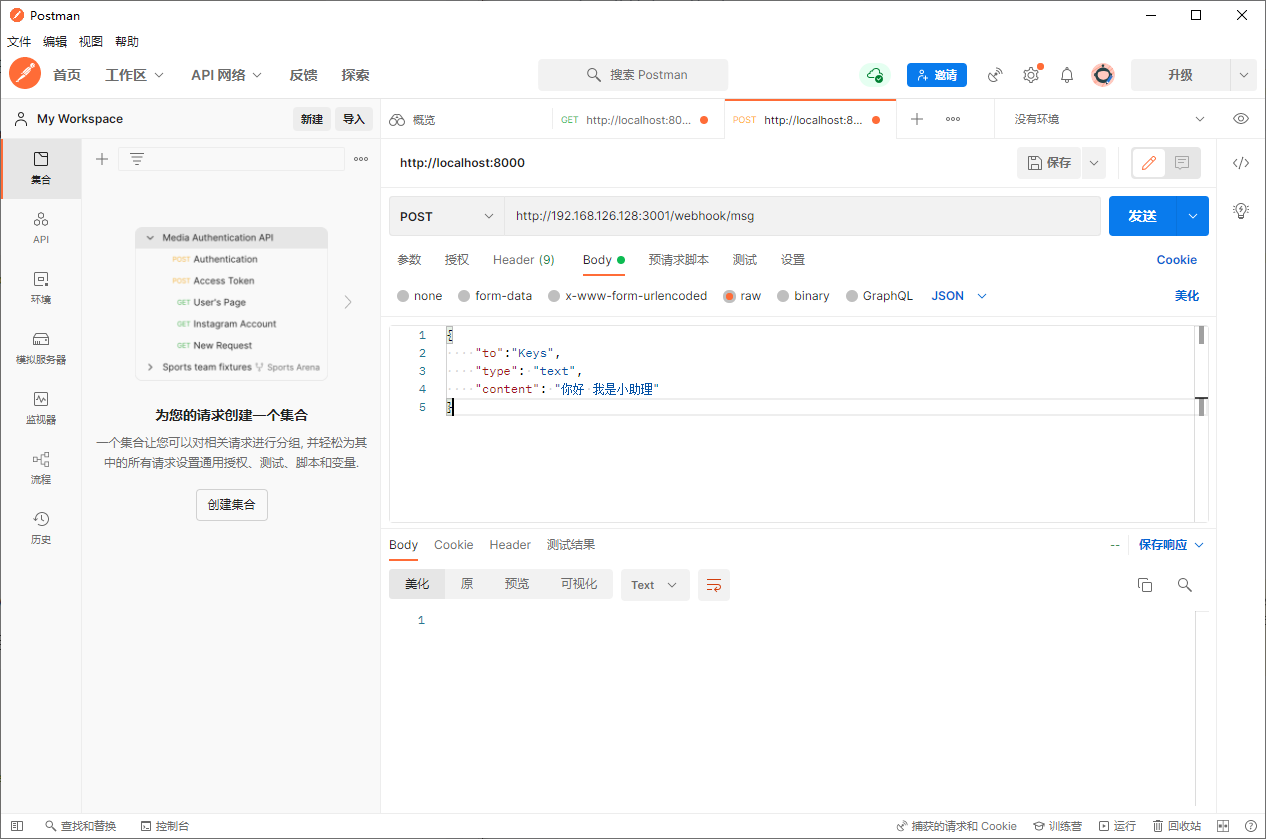
上图中,192.168.126.128为你部署docker镜像的主机IP,3001为你启动微信机器人这个镜像时设置的端口号,to为接收方的昵称(注:不是你备注的,而是对方自己设置的昵称)其他的就不需要修改了,只是测试一下是否联通而已(注意:如果只有一个手机的话,切换账号之后,当前账号会在所有设备上登出,因为这个还找了一会问题,甚至看了源码,最好用微信分身【这样就不用切换账号了】,谁叫iPhone不支持,真的艹了)
2、接受信息
启动时需要多添加一行配置
**-e RECVD_MSG_API="**http://localhost:8080/receive_msg "
即微信消息转发地址,微信机器人收到消息后都会转发到目标路径
sudo docker run -d \
--name wxBotWebhook \
-p 3001:3001 \
-e LOGIN_API_TOKEN="techshrimp" \
-e RECVD_MSG_API="http://localhost:8080/receive_msg" \     #增加了这一行配置
dannicool/docker-wechatbot-webhook
可以写一个python的web端来接收转发过来的消息,此处就简单打印了一下
# 先安装依赖
# pip3 install fastapi uvicorn python-multipart
from fastapi import FastAPI, Form
import uvicorn
app = FastAPI()
@app.post("/receive_msg")
async def print_json(type: str = Form(), content: str = Form()):
    print(content)
    return {"message": "Data received and printed"}
if __name__ == "__main__":
    uvicorn.run(app, host="0.0.0.0", port=8080)